AlumDeck

Use case · Alumni fundraising website

Ask once. Thank everyone.

An appeal page with a goal and a running total, a record of every gift, a numbered receipt emailed to each donor, and a CSV the treasurer can open. Money reaches your bank account the way it does today: AlumDeck records gifts; it does not take payments. $49 a year, and no percentage of anything.

How it works

From the ask to the receipt.

  1. Open an appeal

    A title, a summary, the story, a cover image, a goal and optional start and end dates. Two switches decide what the public sees: the running total and the donor list.

  2. Point people at the money

    The giving page has a button you point at wherever you already collect money: your bank details, your institution's payment page or a form you already use.

  3. Record each gift

    Date, amount, method (bank transfer, card, online, cash, cheque or other), a reference, and the donor, linked to a member or typed in. Tick anonymous if they asked. Every gift carries the name of whoever recorded it.

  4. Send the receipt

    The receipt number, such as RCPT-2026-0212, is allocated so that two people recording at once never get the same one. Send receipt emails the donor after checking that email is set up.

  5. Report back

    Export the gifts as CSV for the treasurer. Write a news post on what the money did, then close the appeal; its page stays up as a record.

What it does

The parts an appeal actually uses.

Appeals

Appeals with a running total

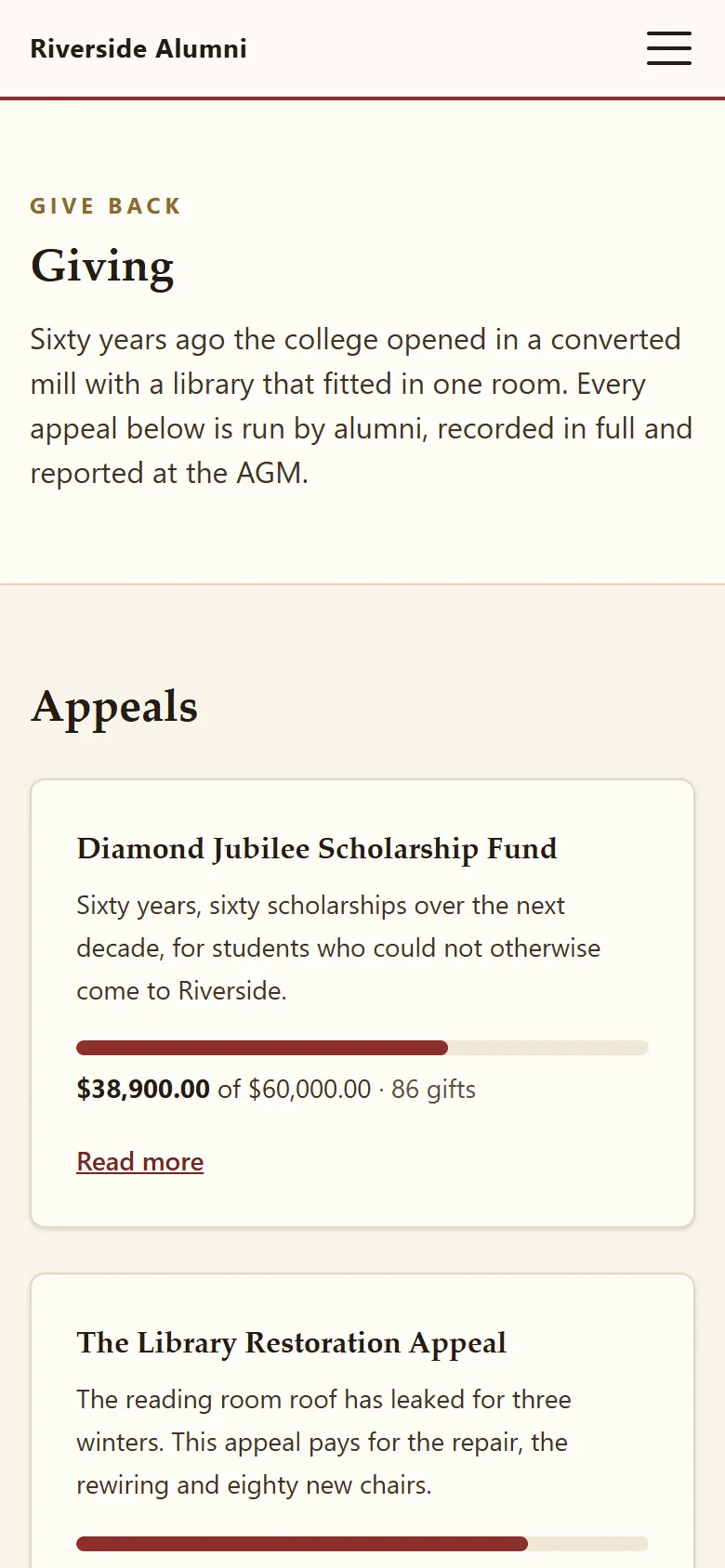
Each appeal has its own page with the amount raised, the goal, a progress bar and the number of gifts. Run several at once, close one when it passes its target, and keep it online as a record.

  • Draft, open and closed states
  • A currency per appeal, kept in whole minor units
  • The giving page lists open appeals and the causes you raise for
The demo giving page

Three appeals, one closed

Donor wall optional

The gift ledger

Every gift in one table

Filter by appeal, method or date. The dashboard shows each appeal against its goal, and this year and last year in total, grouped by currency and never converted.

  • Donor linked to a member record, or typed in
  • Private notes the donor never sees
  • Anonymous gifts kept off the donor wall
Giving records

Receipts

A numbered receipt for every gift

The prefix is yours, and the footer can carry a charity number. Send receipt checks that email is set up first, and shows you the real error if it is not.

  • Numbers run PREFIX-YEAR-0001 and never repeat
  • Sent from your own mail server, under your name
  • The donor message is kept with the gift

The ask

The ask, to the right people

Write the appeal email in Markdown and choose the audience: a class-year range, cities, engagement bands, mentors or volunteers. Count it, send yourself a test, then queue it; it goes out at 60 a minute, checking each member's consent again as it sends.

  • Opens counted for each campaign
  • Members opt out of announcements in their profile
  • A consent-filtered CSV if you would rather send from a mail platform
News and newsletters

Check it yourself

Every claim on this page, checkable in the demo.

  • Check it

    A live appeal

    The demo Library Restoration Appeal: running total, gift count and named donors.

    Open the appeal
  • Check it

    Receipts in the admin

    Sign in as the demo admin and open Gifts: every row has a receipt number.

    Demo sign-in
  • Check it

    No percentage

    $49 a year is the whole software cost, however much you raise.

    Pricing
  • Check it

    Where it stops

    It records money; it does not take it. The whole list.

    Limitations
  • Check it

    Taking money online

    Planned for release 1.2, on the public roadmap.

    Roadmap
  • Check it

    Your data stays put

    Gift records live in your database, on your hosting.

    Security

Your first month

The first month of an appeal.

Most gifts arrive in the first two days and the last two. Plan the reminder for the second.

The first month of an appeal
WeekThe committeeIn AlumDeck
1Pick one finishable thing and cost it honestly.Draft the appeal: the story, the goal, the closing date and a cover image.
2Agree how money arrives: transfer details, your payment page, cheques.Point the giving page button at it. Set the receipt prefix and the footer.
3Send the ask to the classes most likely to care.Open the appeal, email a segment, record gifts as they land.
4One reminder near the close; thank people by name where they allow it.Send receipts, export the CSV for the treasurer, post the result.

Sample data in the live demo

Riverside College restores its library

The demo association's Library Restoration Appeal pays for a new roof, rewiring and eighty chairs. Every gift is recorded, receipted and listed on the donor wall if the donor agreed.

Try it in the demo

The honest part

Where it stops, before you promise donors anything.

  • Online donation forms, card payments and recurring gifts. Planned: release 1.2
  • PDF receipts and tax wording for your country. Receipts are emails with your footer. Planned: release 1.2
  • Financial-year reports. Dashboard totals run by calendar year; the CSV covers any date range. Planned: release 1.2
  • Local number formats. Amounts always print as 1,234.56 with the symbol in front. Planned: release 1.2
  • A one-click unsubscribe link in campaign emails. Opt-outs are made in the member's profile and checked at every send. Planned: release 1.1
  • Giving days, matching gifts and peer-to-peer pages. Planned: release 1.6
  • Donor postal addresses, for sending a paper receipt.

The rest is on the full list of what AlumDeck does not do, and each planned item is on the public roadmap.

Questions

What treasurers ask

Does AlumDeck take a percentage of what we raise?

No. The licence is $49 a year per live site and that is the whole software cost. There is no platform fee, no per-gift cut and no merchant account, because no money passes through AlumDeck at all.

How does the money actually reach us?

The way it does today: a bank transfer, your institution's own payment page, a standing order, a cheque at the reunion. The giving page has a button you point at wherever you already collect money. When a gift arrives, someone with the giving area records it, and AlumDeck sends the receipt.

Can we run several appeals at once?

Yes, each with its own page, goal, dates and switches for the running total and the donor list. For a first appeal we would still run one at a time: two asks in the same month usually raise less than one clear ask.

Can we record gifts in more than one currency?

Yes. Each appeal and each gift stores its own currency code, amounts are kept in whole minor units (a 1,000 yen gift is 1,000 yen), and dashboard totals are grouped by currency and never converted. Amounts print as 1,234.56 with the symbol in front, whatever the currency.

Is our donor data visible to you?

No. Gift records live in your database on your hosting, and we have no copy and no access. The software checks its licence about twice a day, sending the key and your hostname; nothing about a donor is in it.

What does the treasurer get?

A CSV of all gifts or a selection, filtered by appeal, method or date range, with spreadsheet formulas neutralised on the way out. The dashboard shows each appeal against its goal and this year and last year in total, by calendar year.

Also for

Where the donors come from.

  • Class reunion website

    RSVPs against the hall capacity, free QR tickets, check-in at the door and a room for each year.

    Plan a reunion
  • School heritage archive

    A timeline, In Memoriam with the family's consent, a hall of fame and a photo archive.

    Keep the history
  • Alumni associations

    Volunteer committees that change at every AGM. A site the next committee inherits, with a login for every post.

    For associations

Open the demo appeal.

Sign in as the demo admin and open Money: the appeals, the gift ledger and the receipt numbers are all there. It puts itself back every night.

Sign-in details on the demo pageResets every night