AlumDeck

Gather · Email, texts & WhatsApp

One audience. Four ways to reach it.

Build a newsletter from blocks, choose exactly who gets it, and send it now or on a schedule, through your own mail server. Text messages, WhatsApp and push notifications go through accounts your association holds, so every list stays yours.

  • 60emails a minute, unless you change it
  • 10kinds of block in the designer
  • 3automations, each off until you switch it on
  • 160characters to one part of a text message

How it works

Write it once, reach the right people.

Email through your own mail server. Texts, WhatsApp and push through accounts you hold.

The designer

A newsletter built from blocks

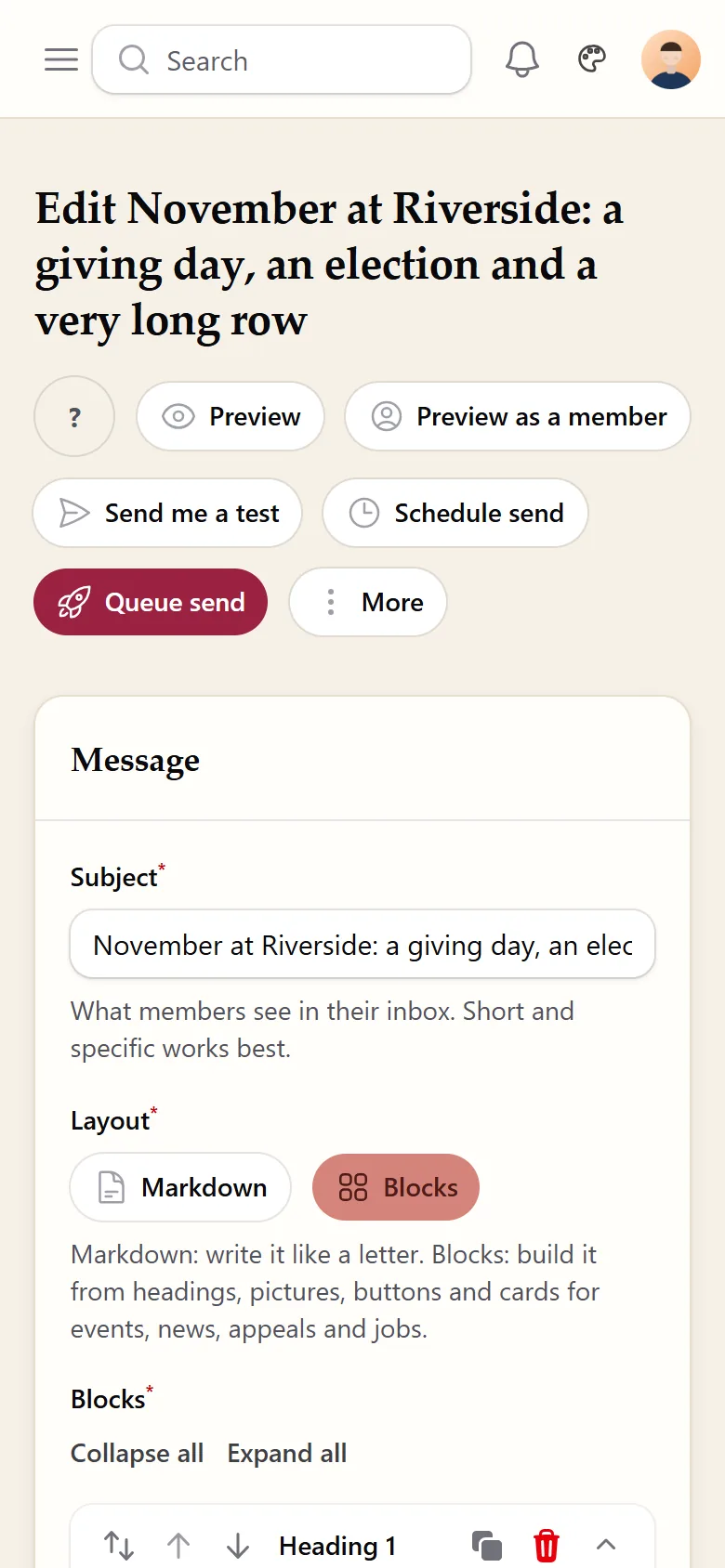
Write in Markdown, or stack blocks: a heading, text, an image from the media library, a button, a divider, two columns, and cards for an event, a news post, an appeal or the latest jobs. A block email uses your colour and logo and carries a plain-text version. Preview it at computer and phone width, then send yourself a test.

  • Save a draft as a template and start the next one from it
  • Every automatic email in one branded design, reworded per language
  • A newsletter archive in the member area, if you mark a campaign for it
Audiences

Exactly the people you mean

Build the audience on the campaign, or keep it as a saved audience with a live count and ten example names. Combine year groups, cities, countries, engagement bands, mentors, volunteers, skills, who came to an event, who gave between two dates, who opened or clicked a campaign and who has not signed in. The audience is worked out when the campaign is queued, not when it was saved.

  • Giving conditions are shown only to people allowed to see money
  • Bounced and "do not email" addresses are skipped by every bulk email
  • Contacts who are not members, such as parents or partners, on lists of their own

Sending

Send now, later, or ask someone to check first

Queue a campaign now or schedule it for a date and time in the site's timezone. The sending speed is shared by everything that sends in bulk, so a newsletter never crowds out a reminder. The report shows who it reached, and a send that would take more than a day says so before you confirm.

  • "Request send" for staff who may write but not send
  • A test of two subject lines on one campaign
  • With a bounce mailbox set up, dead addresses are added to the undeliverable list by themselves

Automations

Three emails that send themselves

A welcome series after approval or first sign-in, a "we miss you" email when a member goes quiet, at most once in 180 days, and anniversary greetings on milestone years. Each is off until you switch it on, never back-fills by surprise, and has a preview, a test to yourself and a history.

  • "Include existing members" shows how many would get it first
  • Weekly and monthly digests collect news, events, jobs and new classmates
  • A digest with nothing new is not sent

Text messages

Texts only to members who asked for them

Switch text messages on and connect your own account with Twilio, Vonage or another provider through a simple HTTP gateway. A member adds their mobile number and proves it with a six-digit code. Write the text, pick an audience, count the recipients with the estimated cost, then queue it.

  • Replying STOP switches a member off, START back on
  • 160 characters to a part, 70 once an emoji or a curly quote is in it
  • Every opt-in and opt-out is in the audit log

WhatsApp and push

WhatsApp two ways, and a bell that needs no email

The free way: filter members, write the message once, and AlumDeck gives you one "Open chat" link per member to send from your own phone. The other way: connect your WhatsApp Business account and send approved templates from the server. Members also have a notification bell in the member area, and can allow push notifications on their own device once you switch push on.

  • WhatsApp Business and push each ship switched off
  • Limits you set: messages a minute and in a day
  • A member's notifications are kept 180 days, unless you change it
News and newsletters

Not yet

What email and messages do not do yet.

A tag means a fix is planned. No tag means it is not.

  • Full A/B tests of content or send times: a campaign can test two subject lines, and no more
  • A two-way inbox for texts or WhatsApp: a reply only switches a member off (STOP) or back on (START)
  • Free-form WhatsApp broadcasts from the server: WhatsApp allows only templates it has approved
  • Bounce reading from mailboxes that allow only OAuth sign-in, such as Microsoft 365 or Google Workspace with password sign-in switched off
  • Open and click counting from the first day: it starts switched off, for you to turn on where you have consent
  • Reply-by-email: answering a notification does not post back to the site

FAQ

Questions communications officers ask

Do we need a separate email service?

No. Campaigns go out through your own mail server, the one you set up in Settings, Email, at 60 emails a minute unless you change it, with an hourly limit if your host has one. If you would rather use another service, export the members who opted in as a CSV.

Does it count opens and clicks?

Only if you switch counting on. It starts off on a new install, for you to turn on where you have consent for it. Once on, the report shows opens, clicks for each link and unsubscribes, and offers to send again to the people who did not open, 48 hours after the send.

Can members choose what they get?

Yes. For each kind of email a member chooses at once, weekly, monthly or off, from the link in every optional email, with no sign-in needed, or from their profile. A message one person is waiting for, such as a sign-in code or their ticket, is always sent at once.

What do text messages and WhatsApp cost?

AlumDeck charges nothing for them. Texts go through your association's own account with an SMS provider, and the screen shows the estimated cost before you send. A WhatsApp list you send from your own phone is free. Sending WhatsApp from the server needs your own WhatsApp Business account.

Can someone write a campaign without being allowed to send it?

Yes. Sending is its own permission. Staff who may write but not send see "Request send" on a draft: it alerts everyone who may send, and nothing goes out until one of them has checked it.

Open a draft campaign in the demo.

Sign in as the administrator, open Publishing, Email campaigns and count an audience. Nothing is sent from the demo.

Sign-in details on the demo pageResets every night

Type a word, or start with one of these pages.

↑ ↓ moveEnter openEsc close